

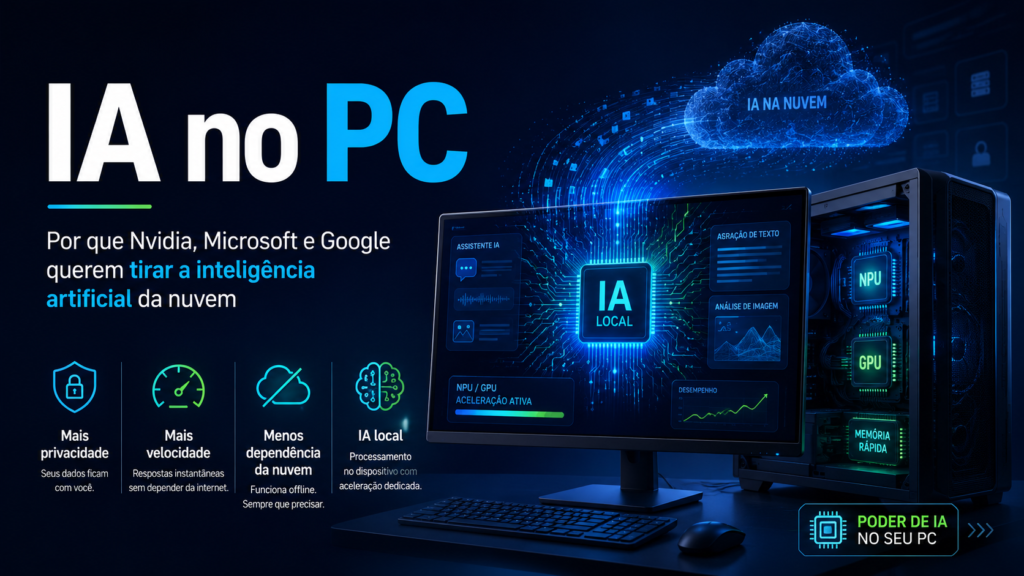
IA no PC is no longer just a promise for gamers, programmers or giant technology companies.
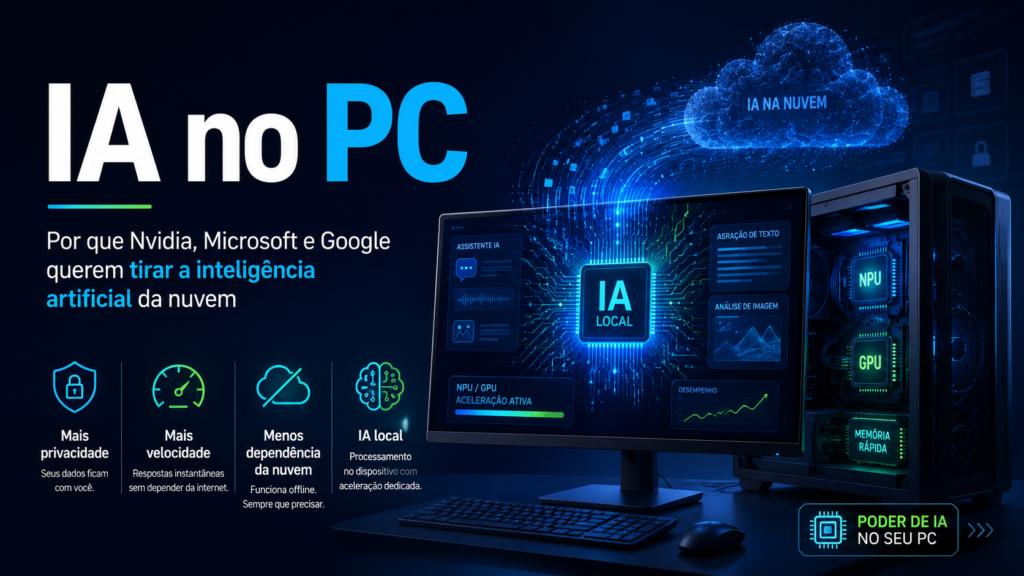
The new dispute between Nvidia, Microsoft and Google shows that the next phase of artificial intelligence can happen within the computer itself, and not just on cloud servers.
For a long time, using AI meant sending data to distant data centers.
You asked a question, uploaded a file, requested a summary or generated an image, and everything was processed by external servers.
Now, this logic begins to change.
The focus of large companies became local artificial intelligence, also called on-device AI, that is, AI that runs directly on the user's device.
This doesn't mean the cloud will disappear.
But it means that many AI tasks can be performed on the PC itself, with more speed, more privacy and less connection dependence.
What is AI on PC
IA no PC is the use of artificial intelligence models running locally on the computer.
Instead of always depending on an online server, the PC hardware itself processes part of the tasks.
This may involve text summarization, translation, response generation, file organization, image editing, task automation and personal assistants.
The difference is in the processing location.
In cloud AI, data generally leaves the device and is sent to servers.
In local AI, part of the work happens inside the computer, using GPU, NPU, CPU, or local memory.
This change is important because it brings AI closer to the user.
It stops being just a remote service and starts to function as a layer integrated into the system, files, applications and the browser.
Why the cloud is not enough
The cloud remains powerful.
It's essential for giant models, AI training, heavy processing, and services that need to scale to millions of users.
The problem is that not every task needs to go through a data center.
Many everyday actions are repetitive, personal and sensitive.
Summarizing a private document, searching for something in local files or organizing work information can be safer when the processing is on the device itself.
Another point is speed.
When AI runs locally, the response can be faster because it does not depend as much on the internet, server queue or network latency.
There is also the cost.
Companies spend a lot to keep models running on servers.
The more simple tasks that are offloaded to the user's device, the lower the cost of cloud inferencing can be.
Nvidia's move
Nvidia plays a central role in this change because its GPUs are already widely used in AI.
In recent years, the company has ceased to be seen solely as a manufacturer of graphics cards and has become the center of artificial intelligence infrastructure.
Now, interest is also in the personal computer.
Nvidia claims PCs with RTX can run Locally accelerated AI, allowing agents to run on the device, with data remaining on the PC itself.
The company also announced, together with Microsoft, a new phase of Windows PCs aimed at personal AI agents.
According to Nvidia, the RTX Spark was introduced as the basis for Windows PCs built for personal agents, with up to 1 petaflop of AI performance and up to 128 GB of unified memory.
This move shows a clear ambition.
Nvidia wants the PC to stop being just a machine that accesses AI online and become a machine that runs AI natively.
Microsoft's role
Microsoft is also pushing this transition with Copilot PCs.
According to the company's documentation, these computers are a new category of Windows 11 PCs equipped with a high-performance NPU, capable of performing more than 40 trillion operations per second.
The NPU is a unit specialized in artificial intelligence tasks.
It is designed to process AI operations more energy efficiently than a typical CPU.
This helps with features like real-time translation, image generation, smart search, camera effects, content summarization, and system automations.
For the common user, the technical part matters less than the result.
The promise is a computer that better understands context, responds faster and executes intelligent resources without constantly depending on the cloud.
For companies, the argument is even stronger.
Microsoft highlights that Copilot PCs for business combine AI with corporate files, applications and data, as well as built-in security features.
Google's way
Google is also bringing AI closer to the user's device, especially through Chrome and Gemini Nano.
The Chrome documentation for developers proposes Browser-integrated AI, using Gemini Nano for features such as summarizing, translating, writing and rewriting texts.
This strategy is very relevant because the browser is one of the most used tools on the PC.
If AI runs inside Chrome, it can help with pages, texts, forms, tabs and web applications.
Google also reports that the Prompt API allows you to send natural language requests to Gemini Nano in Chrome.
In 2026, Chrome announced advancements in its web AI kit, including stable Prompt API in Chrome 148 with Gemini Nano, multimodal support, and structured output.
In practice, this can allow sites and extensions to use smart features without always relying on a call to external servers.
It's a big change for web developers.
Simple writing, summarizing, translating, and organizing applications can gain local AI right in the browser.
Privacy became an argument
One of the biggest arguments of AI outside the cloud is privacy.
When processing happens locally, sensitive data may remain on the device.
This is important for personal documents, work files, messages, private images, and corporate data.
Nvidia, for example, highlights that local AI on RTX PCs allows it to keep agents running on the device while the data remains on the computer itself.
Google also advocates local execution as a way to improve privacy, reduce cost and allow offline operation in certain scenarios.
But this needs to be explained carefully.
Spinning AI locally doesn't mean automatic privacy in all cases.
If an app collects data, syncs information, or sends history to servers, there may still be risks.
The difference is that local architecture allows you to create more private experiences, as long as the software is well designed.
Speed and offline use
Another benefit of local artificial intelligence is the speed.
When a task runs on the PC itself, the response can be more immediate.
This improves experiences such as autocomplete, translation, quick summary, file search and information organization.
There is also offline use.
If the model is available on the device, some features may continue to work even without internet.
This is useful for students, traveling professionals, teams in the field, or people with unstable connections.
Nvidia's documentation for applications on RTX PCs cites local availability, privacy and the ability to run inferences without relying on connectivity as advantages for developers.
This point helps explain why local AI is not just a technical trend.
It improves the real user experience.
Not everything will come out of the cloud
Despite progress, it is wrong to say that all AI will leave the cloud.
The most likely future is hybrid.
Light, private and frequent tasks can run on the PC.
Heavy tasks, larger models, and complex operations continue in the cloud.
Google itself works with the idea of hybrid inference, allowing you to switch between local models and cloud-hosted models depending on hardware, system and need.
This makes sense.
A common PC can summarize texts, organize files and generate simple responses.
But training large models or running very complex tasks still requires powerful data centers.
The correct question is not “cloud or PC?”.
The correct question is: “which task should run in each place?”.
What changes for the common user
For the average user, the change may appear discreetly.
The computer starts suggesting better actions, understanding files, summarizing pages and helping with tasks without opening a separate chatbot.
AI can be embedded in the operating system, browser, text editor, imaging program and productivity applications.
This makes use more natural.
Instead of copying a text, opening an online tool, pasting the content and waiting for a response, the app itself can offer help in the right context.
This is the main objective of companies.
Transform AI into a native computer function.
What changes for companies
For companies, IA no PC can reduce costs, improve safety and increase productivity.
Teams can use local assistants to search for documents, summarize meetings, classify files, and automate internal tasks.
In sectors that deal with sensitive data, such as legal, finance, healthcare, engineering and education, local processing can be a differentiator.
But adoption needs to be well planned.
Companies must evaluate hardware, data policies, compliance, permissions, security and governance.
Local AI helps, but doesn't eliminate risk.
The downside of local AI
Not everything is an advantage.
Local models take up storage space, require compatible hardware, and can consume battery or performance.
There is also a risk that the user will not know exactly which AI features are active on the device.
This point has already generated debate around local models integrated into Chrome.
Recent reports have highlighted concerns about transparency, footprint, and user control regarding Gemini Nano in the browser.
Therefore, the local AI trend needs to be accompanied by clear controls.
The user must know when the AI is active, what data is used, and how to disable features they don't want.
Without transparency, a useful technology can become a source of distrust.
How to choose a PC for AI
Anyone thinking about buying a computer in the next few years should look at more than just the processor and RAM.
The presence of NPU, compatible GPU, good amount of RAM and support for AI resources tends to gain importance.
For simple tasks, a Copilot PC with NPU may be sufficient.
For heavier tasks like imaging, larger local models, and creative flows, a dedicated GPU can make a difference.
It is also important to look at the ecosystem.
Windows, Chrome, creative apps and productivity tools are adapting to this new phase.
Buying hardware without considering real software support can lead to frustration.
Is it worth worrying now
Yes, but without being in too much of a hurry.
A IA no PC is still maturing.
Some functions already exist, others are being tested, and many still depend on specific hardware.
The best way is to follow developments and understand which resources make sense for your use.
For those who work with content, programming, editing, productivity or document analysis, the trend is highly relevant.
For those who only use their PC for basic tasks, the change can arrive gradually and almost invisible.
Conclusion
Nvidia, Microsoft and Google want to bring artificial intelligence to the PC because it solves real problems: speed, privacy, cost, offline use and integration with everyday life.
The cloud will remain important, but it will no longer be the only place for AI.
The future will be divided between on-premises models, cloud models and hybrid systems that choose the best path for each task.
For the user, the big change will be realizing that the computer does not just execute commands.
It begins to understand context, suggest actions and work as an assistant closer to your files, apps and routine.
A IA no PC It is not just a technical novelty.
It is the beginning of a new way of using computers.
5. FAQ
What does AI mean on PC
IA no PC it means running artificial intelligence resources directly on the computer, without always relying on cloud servers.
This can include text summarization, translation, smart search, automation and local assistants.
On-premises AI replaces the cloud
Not completely.
The most likely scenario is hybrid: simple, private tasks run locally, while complex tasks continue to use the cloud.
Why Nvidia, Microsoft and Google want AI on the PC
Because local AI can offer more speed, privacy, lower server costs and offline operation.
It also creates a new generation of smarter computers and applications.
I need a new PC to use local AI
It depends on the resource.
Some functions can run on current computers, but advanced features may require NPU, modern GPU or more RAM.
AI on PC is more private
It can be more private when the data stays on the device.
But this depends on how the system, browser or application is designed and what data is sent to servers.
Continue lendo
AI Automation for Small Businesses: Start with the process, not the tool
Guia editorial do HTechBD sobre automação prática para pequenos negócios, com critérios práticos, cuidados, exemplos de uso e…
AI for studying: where it really helps and where it can get in the way
Guia editorial do HTechBD sobre uso de IA em rotinas de estudo, com critérios práticos, cuidados, exemplos de…

Better Prompts Start with Context: A Simple Method for More Helpful Responses
Guia editorial do HTechBD sobre criação de prompts com contexto e critérios, com critérios práticos, cuidados, exemplos de…